Happy Bob
- 3.2
- Rating
- 10.00K
- Installs
- Free
- Price

 Analysis by App-foxy
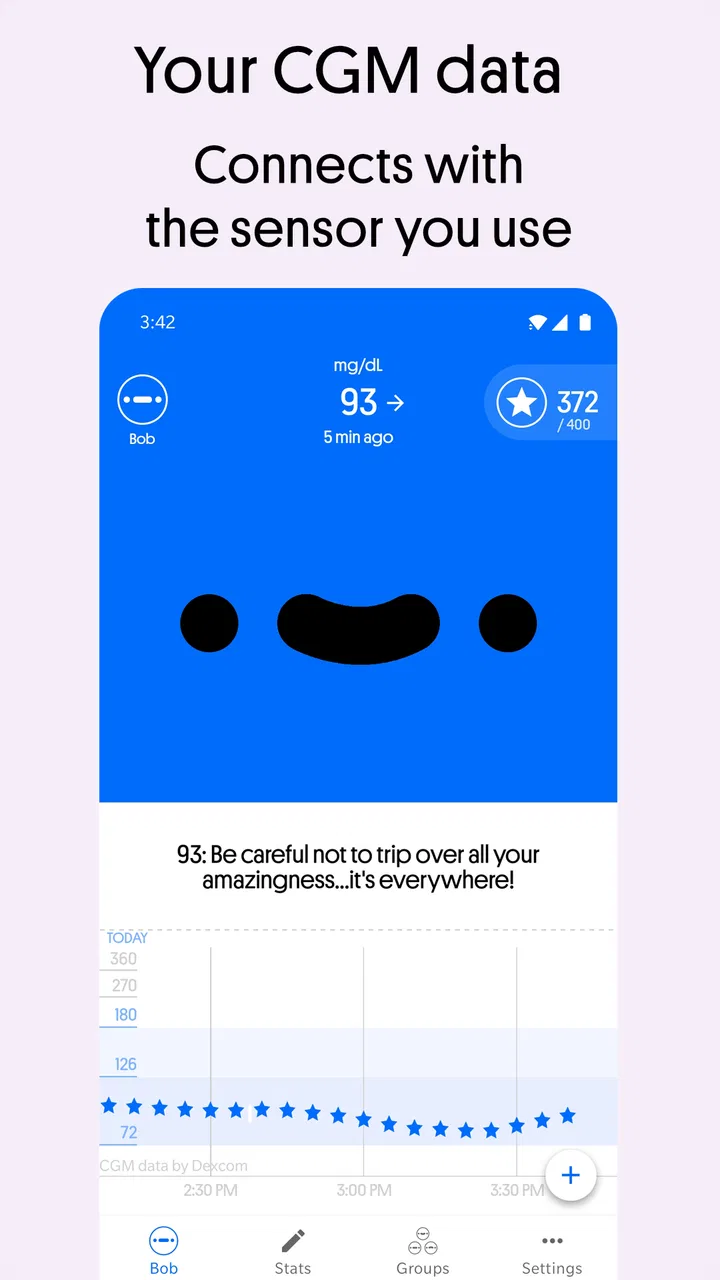
Managing diabetes can turn into a long chain of small decisions: checking a glucose reading, noticing a trend, remembering what happened earlier, and trying not to feel discouraged when the numbers do not behave as expected. Happy Bob approaches that routine from a lighter angle. It is a free medical app from Harald AI Oy, presented as a rewarding companion for diabetes management and an authorized Dexcom Connected Partner. In my experience, its appeal is less about replacing clinical care and more about making daily attention feel a little less mechanical.
I would look at it as a companion for people who already use compatible diabetes-monitoring routines and want an additional layer of encouragement. That distinction matters. This is not the kind of app I would treat as a diagnosis tool, an emergency service, or a substitute for a doctor’s instructions. Its value depends on how comfortably it fits around the tools you already trust and how much motivation you get from a more engaging presentation of your routine.
Where Happy Bob fits into everyday diabetes care
The app belongs to the medical category, but its tone is notably more approachable than a traditional clinical logbook. The store summary frames it around rewarding diabetes management, while the short description simply identifies it as Happy Bob. That simplicity reflects the central idea: diabetes care is demanding enough already, so a small sense of progress can make repeated tasks easier to return to.
You May Also Like

 Blood Strike: 2.5 Anniversary
Blood Strike’s Loadouts Turn Every Drop Into a Tactical Gamble
A close look at Blood Strike’s custom loadouts: how fast access to signature weapons reshapes its battle royale rhythm, rewards preparation, and narrows the gap between fights.

 Pandora - Music & Podcasts
Pandora’s Music Is Easy to Start, but Harder to Recover
Pandora’s strength is its low-effort path from a seed to a station. Its weak spot is how much confidence it asks you to place in connection, setup, and quiet recovery.

 8 Ball Pool
 Is Built on Rivalries, Rematches, and Routine
A close look at the rivalries, rematches, shared routines, and unanswered safety questions that turn a quick pool match into a persistent mobile community.

 Samsung Music
’s Quiet Strength Is Playing What You Already Own
Its reach comes less from spectacle than from dependable access to a personal library. That simplicity is both the app’s strongest retention engine and its ceiling.

 AccuWeather: Weather Radar
AccuWeather Review: A Quick, Clear Forecast for Everyday Decisions
For everyday plans, the best forecast is the one you can understand quickly. AccuWeather makes rain timing, radar, and local conditions easy to act on, with a few trade-offs.

 Hill Climb Racing
Why Hill Climb Racing Still Turns Crashes Into One More Run
A tiny car, a bumpy hill and one more upgrade: Hill Climb Racing keeps resurfacing because its simple chaos makes every near-miss feel personal.
More From Our News Desk
View All News


I can imagine opening it during an ordinary morning rather than only during a serious review of health information. After checking a glucose trend, I might use the app as a quick motivational stop before starting work. Later, it could serve as a reminder to look back at how the day is going instead of relying on memory. The benefit is psychological and practical at the same time: anything that helps a person stay engaged with an established routine may be useful, provided it does not distract from the medical meaning of the readings.
That last condition is important. A rewarding interface can make a difficult routine feel friendlier, but it should never encourage someone to chase a reward or react emotionally to a single result. Glucose management is full of context. Meals, activity, medication, illness, stress, sleep, and timing all matter. I would use Happy Bob to support awareness, not to decide on treatment changes.
The app has been available since September 2020, and its current version is 1.15.2. It supports Android 8.0 and later, which makes it accessible to people using older Android phones as well as newer devices. Its age rating is Everyone, so the presentation is intended to be broadly suitable rather than restricted to adults. That does not remove the need for responsible use: a general audience rating is not the same thing as medical supervision.
What the download numbers and rating suggest
Happy Bob has passed 10K installs, with an average rating of 3.2 from 262 ratings and 88 written reviews. I would read that as a sign of a real but still relatively modest user base, not as proof that the app will suit every diabetes routine. The rating is mixed enough to justify trying it carefully rather than assuming the experience will be universally smooth.
Because the app is free to install, the initial decision is comparatively easy. There are in-app purchases ranging from $5.99 to $69.99 per item, so I would pay attention to any upgrade or purchase screen before confirming anything. A free download can be a sensible way to test the basic experience, but it is worth deciding in advance whether paid extras would genuinely improve your routine or merely add another recurring decision to manage.
The developer is Harald AI Oy. That is useful context when deciding how much trust to place in the product: the developer identity is visible, while the app’s role as an authorized Dexcom Connected Partner gives it a specific connection to the Dexcom ecosystem. I would still separate that partnership status from broader assumptions about privacy, clinical oversight, or the exact way information is handled. Trust should come from the controls and explanations you can actually inspect, not from a general impression.
Trust begins with the connection you choose
For a health app, the first meaningful trust decision usually happens before the first rewarding interaction. If Happy Bob connects to a glucose-monitoring service, I would pause at the connection screen and read what access is being requested, what account is involved, and whether the connection can later be removed. The fact that an app is designed to work with a recognized diabetes platform does not mean I should approve every prompt automatically.
My practical approach would be to install it on the phone I normally use, review each permission in plain language, and avoid granting access that does not seem necessary for the function I want. I would also check whether the app lets me sign out or disconnect without deleting the underlying health account. Those are small steps, but they make the difference between using an app deliberately and allowing it to become an invisible part of a sensitive data flow.
I would be especially careful if the phone is shared with family members, used for work, or repaired by someone else. Diabetes information is personal even when it looks like a stream of ordinary readings. A lock screen, notification preview, or open session can reveal more than intended. Happy Bob should therefore be treated as part of a private health setup, not like a casual entertainment app.
Controls I would check before settling in
The most useful controls are often the least exciting ones. I would look for account settings, connection management, notification choices, and a clear way to stop using the app. If the app offers a choice about what appears on screen, I would keep only the information that helps me act. Extra prompts may feel encouraging at first, but too many reminders can become background noise, especially for someone already receiving alerts from a glucose monitor.
I would also check whether a family member, caregiver, or clinician needs access. If another person is involved in my diabetes care, I would not assume that Happy Bob automatically provides the right sharing workflow. I would use only a sharing option that is clearly explained and appropriate for that relationship. If the app is primarily personal, I would keep the account personal rather than forwarding screenshots or credentials as a workaround.
Another sensible habit is to review the settings after an update. Version 1.15.2 may improve compatibility or behavior, but an update is also a good moment to confirm that notification preferences, connected services, and account choices still match my intentions. I would not make this a daily chore. A quick check after a significant change is enough for most people.
Moments when data sensitivity matters most
The sensitive moments are not limited to installation. They appear whenever the app receives, displays, stores, or shares health information. A person may be comfortable seeing a glucose-related prompt at home but not on a crowded train. I would therefore consider notification content carefully. If a message reveals medical information on the lock screen, I would reduce its detail or turn it off and rely on the app itself when I choose to open it.
Travel is another situation where I would be cautious. A phone may be borrowed, inspected, misplaced, or connected to unfamiliar networks. Before a trip, I would confirm that I know how to sign out, how to reconnect the service, and where the relevant account controls are. I would also avoid making treatment decisions simply because the app’s presentation feels urgent or emotionally persuasive.
During a clinic visit, Happy Bob might be useful as a conversation aid if it helps me remember patterns or questions. I would still bring the original clinical information and follow the clinician’s interpretation. A motivational view can highlight that I have been paying attention, but it does not automatically explain why a pattern occurred. The safest workflow is to use the app to prepare better questions, not to turn its feedback into a prescription.
Families should think about this differently depending on age and responsibility. The Everyone rating makes the app broadly accessible, but children and teenagers may need an adult to help interpret what the app shows. A reward-oriented experience can be encouraging, yet it can also make a young user feel that every reading is a personal success or failure. I would frame it as a support tool and keep medical decisions with the responsible adult and care team.
How I would use it without giving up control
My preferred routine would be gradual. I would begin with the free version, connect only the service I actually need, and spend several days observing whether the app reduces friction or simply adds another place to look. I would not purchase anything during the first session. That pause makes it easier to judge whether the reward system fits my personality rather than responding to the excitement of a new download.
I would also create a simple personal rule: clinical decisions come from my care plan, while Happy Bob helps me stay engaged with that plan. If the app makes me feel pressured, guilty, or distracted, I would reduce notifications or stop using the motivational layer. The best tool is not the one with the most activity; it is the one I can use consistently without losing perspective.
A useful trick is to separate review time from reaction time. I might glance at the app during the day for encouragement, but reserve pattern discussions for a calm moment when I can consider meals, exercise, medication, and other circumstances. That prevents a colorful or rewarding presentation from turning one unexpected reading into an impulsive decision.
I would keep my account details tidy as well. A strong password, a private device profile, and occasional checks of connected services are sensible safeguards. If I stop using the app, I would disconnect it and review the account options instead of merely deleting the icon. Removing an app from a home screen is not always the same as closing an account or ending a connection.
Where it is stronger than a plain logbook
Compared with a basic diabetes diary, Happy Bob has a clearer emotional purpose. A conventional logbook is often excellent for entering information and reviewing it in a clinical format, but it may feel repetitive. Happy Bob’s rewarding approach can help someone who understands what they should do but struggles to maintain interest in the routine.
It may also feel more approachable than a spreadsheet. Spreadsheets offer flexibility, but they demand setup, discipline, and interpretation. For a person who wants a ready-made companion around compatible glucose data, that effort can be a poor trade. The app’s connection to Dexcom is particularly relevant for users already invested in that ecosystem, because the experience is more likely to fit an existing monitoring habit than a completely separate manual record.
On the other hand, a dedicated clinical platform may be better for detailed reports, professional review, or a care team’s established workflow. A plain diary may be preferable for someone who wants maximum control over what is recorded and where it is stored. Happy Bob makes the most sense when motivation is the missing piece, not when the user is searching for the most comprehensive medical record possible.
Who should try it, and who should skip it
I would recommend trying it to a Dexcom user who wants a friendlier daily companion and is comfortable reviewing account connections carefully. It could also suit someone who loses momentum with repetitive self-care and responds well to visible encouragement. The free entry point makes a low-commitment trial practical, as long as the user remembers that optional purchases are available.
I would be more cautious with someone who does not use a compatible Dexcom-centered routine, dislikes reward mechanics, or wants a completely manual and private journal. It is also not my first choice for a person seeking emergency guidance, diagnosis, medication adjustment, or a full replacement for clinician-facing records. Those needs call for established medical channels and tools designed specifically for them.
People who are highly sensitive to notifications should test the app with conservative settings. The same prompts that motivate one user may irritate another. Likewise, anyone who tends to judge themselves harshly based on readings should consider whether a reward system will feel supportive or create extra pressure. There is no shame in deciding that a quiet logbook is healthier for your mindset.
My cautious verdict after weighing the trade-offs
Happy Bob is an interesting medical companion because it tries to address the emotional burden of diabetes management rather than treating the routine as a list of entries. Harald AI Oy has positioned it around rewarding engagement, and its authorized Dexcom Connected Partner status gives it a clear place for users already working within that ecosystem. The free download and Everyone rating make it approachable, while Android 8.0 support keeps it usable on a wide range of phones.
Still, I would not recommend installing it on autopilot. Health data deserves deliberate permissions, careful notification choices, and a clear understanding of account controls. The mixed 3.2 average from 262 ratings also tells me to keep expectations measured. The app may be genuinely encouraging for one person and unnecessary for another, especially when a clinical platform or simple diary already does the job.
My bottom line is simple: use Happy Bob as a motivational layer, not as the authority over your diabetes care. Start with the free experience, inspect every connection and privacy-related choice, keep medical decisions tied to professional guidance, and stop if the rewards create pressure instead of support. If that balance suits you, the app can make a demanding routine feel more manageable. If you need detailed clinical documentation or complete control over a manual record, a different tool will probably serve you better.
FAQs for Happy Bob
01What is Happy Bob, and what can I do with the app?
Happy Bob is a mobile rewards app that lets users participate in simple activities, such as surveys or other available tasks, in exchange for points or rewards. After installing it, you can create an account, review the activities available to your profile, complete eligible tasks, and track your balance. Availability and reward options may vary depending on your location and account information.
02Is Happy Bob free to download and use?
Yes, Happy Bob is generally free to download, and you do not normally need to pay to create an account or browse available activities. However, the app may require an internet connection, and your mobile provider could charge for data usage. Before joining a task, check its requirements, estimated time, and reward details so you understand what participation involves.
03How do rewards work in Happy Bob?
Rewards in Happy Bob are usually earned by completing qualifying activities successfully. The number of points or the value offered can differ according to the activity, your profile, and your region. Once you reach any required minimum balance, you may be able to redeem your earnings through the payment or gift-card methods supported in the app. Always review the current redemption terms.
04Does Happy Bob require personal information?
Happy Bob may request personal or demographic information to determine which activities are suitable for you and to manage your account or rewards. Some tasks can also ask questions about your preferences, habits, or opinions. Before registering, read the app’s privacy policy and permissions carefully. Avoid providing information that is not necessary, and make sure you understand how submitted data may be used.
05Why might I see few activities or have trouble receiving rewards?
The number of available activities can change frequently because opportunities are targeted by location, age range, interests, and other profile factors. You may also be screened out if your answers do not match a task’s requirements or if an activity reaches its participant limit. Keep your profile accurate, answer consistently, use a stable connection, and check the app regularly for new opportunities and redemption updates.
Pros
- Simple interface makes daily tasks easy to understand.
- Helpful reminders encourage users to stay consistent.
- Lightweight app runs smoothly on most modern devices.
- Progress tracking makes improvements easy to review.
- Suitable for beginners without requiring technical knowledge.
Cons
- Some useful features may be limited to premium users.
- Notifications can become repetitive with frequent use.
- Customization options may feel limited for advanced users.
- Requires regular engagement to deliver meaningful results.
- Performance may vary on older smartphones.

Happy Bob
Gallery